


Umbraco 13 to 17 Upgrade Guide
Umbraco 13 to 17 Upgrade Guide
Upgrading an Umbraco project from v13 to v17 is a major but very rewarding step. Umbraco 17 comes with noticeable improvements in performance, modern .NET support, better editor experiences, and improved long term maintainability. That said, this upgrade also brings in a few breaking changes which need to be handled carefully.
This article walking through a real-world upgrade experience, covering the key changes we encountered, common issues faced during the upgrade, and the practical fixes that worked well.
Upgrade Overview
Umbraco v17 runs on .NET 10 and introduces TipTap as the default rich text editor. Along with this, some older middleware and packages have been deprecated, and a few development time behaviours have changed compared to v13.
Because of these changes, the upgrade touches multiple areas of the application and should not be treated as a simple version bump.
Key areas impacted during this upgrade:
- Target Framework upgrade to .NET 10
- Startup and middleware cleanup
- Models Builder regeneration
- Smidge minification changes
- Upgrade flow and unattended upgrade handling
- Rich Text Editors (TinyMCE → TipTap)
- Upgrade the application codebase along with all Umbraco backoffice customization code to align with Umbraco v17 changes and deprecated APIs.
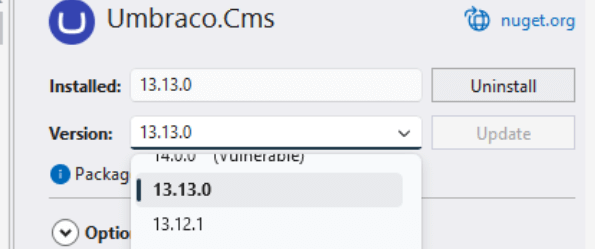
Upgrade v13 Project to Latest v13 Version
Before starting the migration to Umbraco v17, the very first and most important step is to upgrade your existing project to the latest available version of Umbraco v13.
This step helps minimise upgrade issues, ensures all v13 level migrations are already applied, and provides a stable base before moving to v17.
Recommended Steps:
- Update Umbraco to the latest v13 patch version
- Update all installed packages to compatible v13 versions
- Run the site and allow Umbraco to complete any pending upgrades
- Verify the backoffice loads correctly and content is accessible
- Resolve any warnings or errors before proceeding further
Update Target Framework to .NET 10
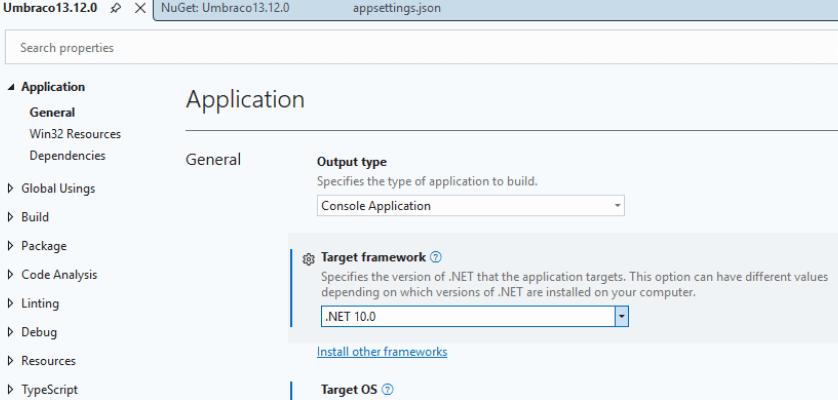
Umbraco 17 runs on .NET 10, so the project’s target framework must be updated accordingly.
- Update the target framework in the .csproj file.
- Verify that all custom libraries and referenced projects are compatible with .NET 10.
Upgrade Umbraco to v17.0.0
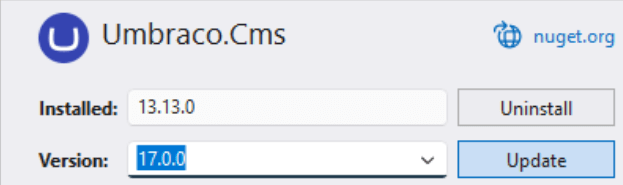
Once the project is stable on the latest v13 version, the next step is to upgrade Umbraco to v17.0.0.
This is the point where the actual major version jump happens and Umbraco applies all required schema and configuration changes for v17.
Recommended Steps:
- Update the Umbraco CMS packages to v17.0.0
- Ensure all custom and third party packages are either compatible with v17 or temporarily removed
- Build the solution and resolve any compile time issues
Remove Deprecated Installer Middleware
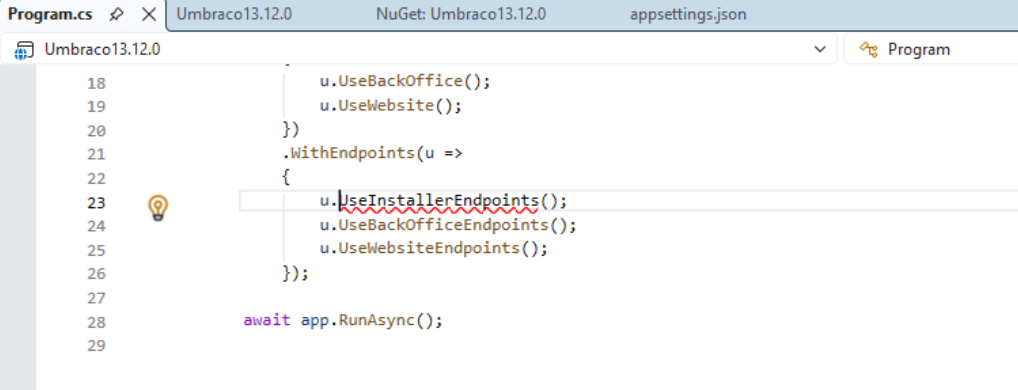
The below middleware is no longer required in Umbraco 17 and should be removed from the startup pipeline:
u.UseInstallerEndpoints();
Keeping this in place may lead to startup or runtime issues after the upgrade.
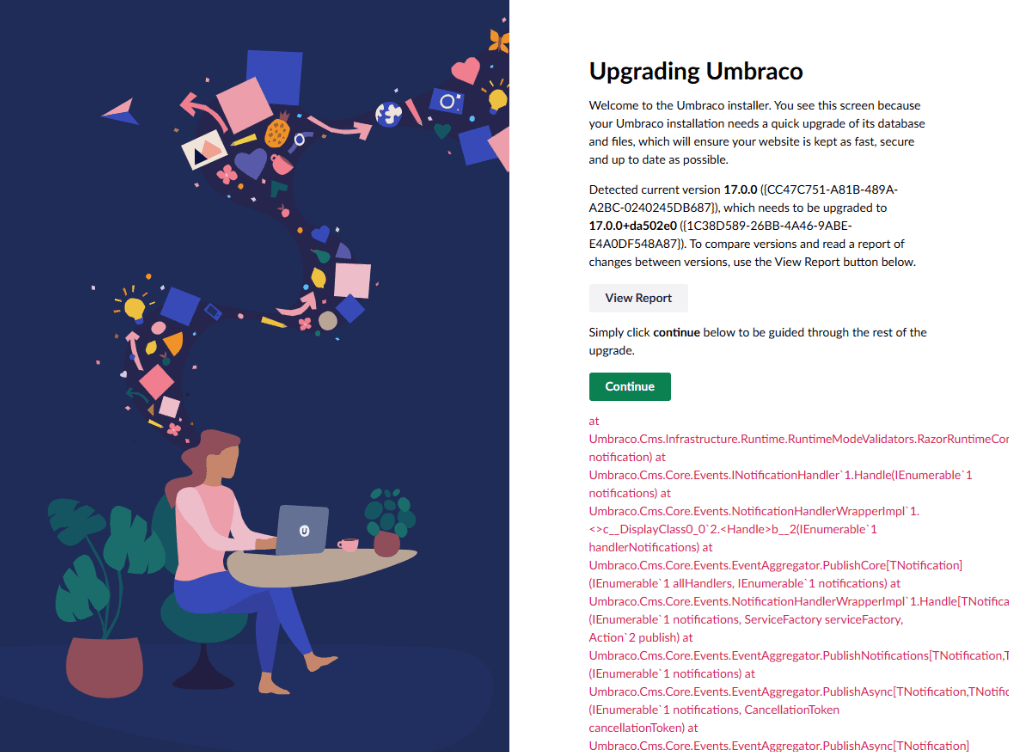
Start the application and allow Umbraco to detect the version change. At this stage, the site may enter maintenance mode until the upgrade process is completed via the backoffice or unattended upgrade settings.
Note: If you face reference issues or build errors after upgrading the packages, try deleting the bin and obj folders from the main Umbraco web project as well as any referenced class library projects. This step usually helps in clearing stale build artifacts and resolving most dependency related issues.
Handling Maintenance Mode During Upgrade
During application startup, the website may appear in maintenance mode while Umbraco validates the version change and upgrade steps.
Unattended Upgrade Setting
If your appsettings.json contains the following configuration:
"Unattended": {
   "UpgradeUnattended": true
}
Umbraco will automatically detect the version change and upgrade the site on startup without any manual intervention.
Important: For a controlled and safer upgrade, it is recommended to remove this setting.
If UpgradeUnattended is not enabled:
- Umbraco displays an upgrade screen
- Login is required
- A brief summary of the version changes is shown before completing the upgrade

Model Builder Issues After Upgrade
If your project uses Models Builder with the following modes:
- SourceCodeManual
- SourceCodeAuto
You may see errors in the generated models after upgrading to v17.
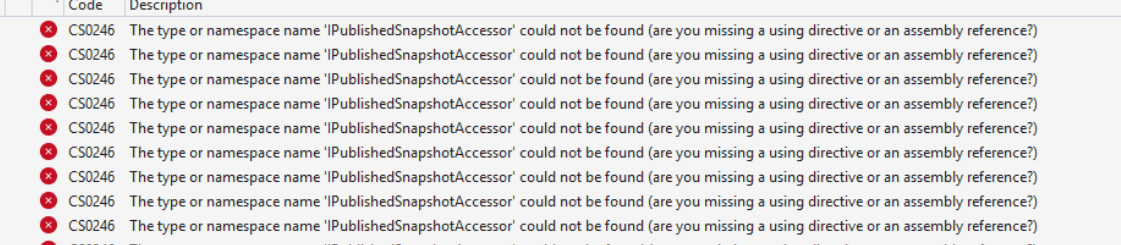
Recommended Fix:
- Remove all generated model files
- Run the project once
- Allow Umbraco to regenerate the models from the backoffice
If your custom .cs files directly reference the generated models:
- Temporarily exclude those files or related core libraries
- Complete the initial application run
- Add them back once the models are regenerated
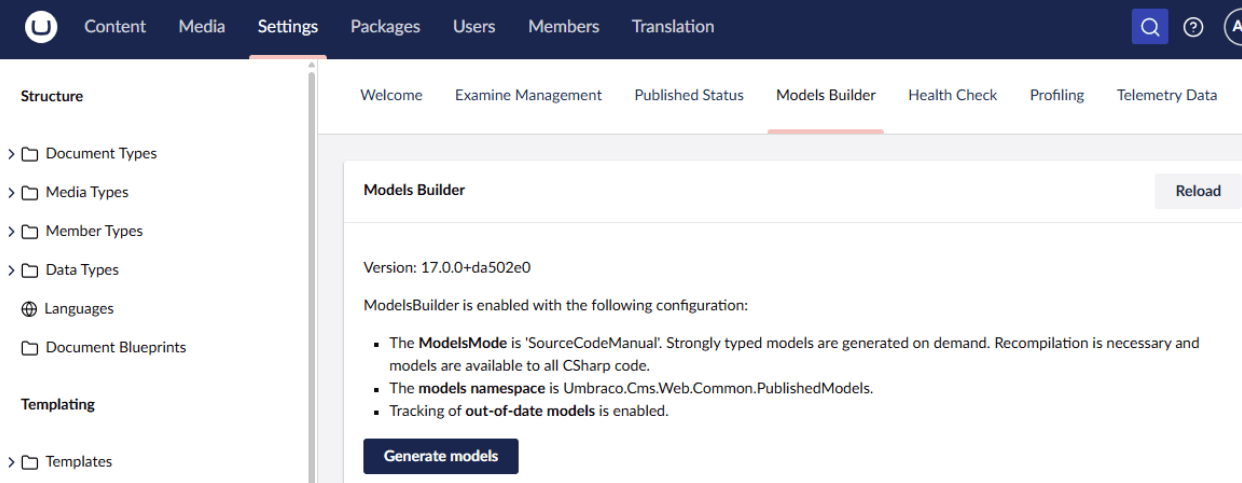
ModelBuilder InMemoryAuto Mode
Microsoft has deprecated Razor runtime compilation in .NET 10.
Because of this change, Umbraco has moved the development-only features required for InMemoryAuto into a separate package:
When Do You Need This?
- If your project uses Models Builder with InMemoryAuto mode
- If you rely on live Razor view updates without rebuilding the project
- This is mainly required for local or development environments
How to Fix the Issue?
To resolve issues related to Razor compilation when using InMemoryAuto, install the development mode package explicitly:
dotnet add package Umbraco.Cms.DevelopmentMode.Backoffice
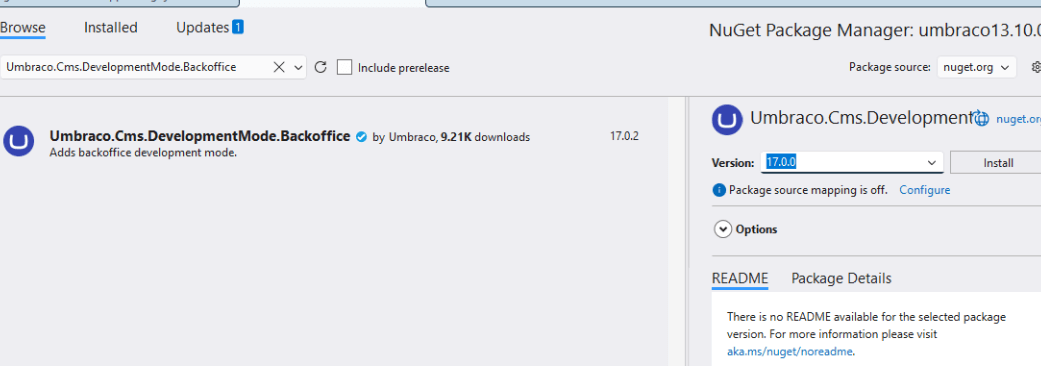
Once the package is installed:
- Restore NuGet packages
- Run the project again
This should resolve the Razor compilation and Models Builder issues related to InMemoryAuto mode in Umbraco 17.
Smidge Errors During Upgrade
While running the upgrade, you may come across Smidge related errors.
Scenario: Smidge Not Used
If your project does not use Smidge, then remove Smidge references from _ViewImports.cshtml
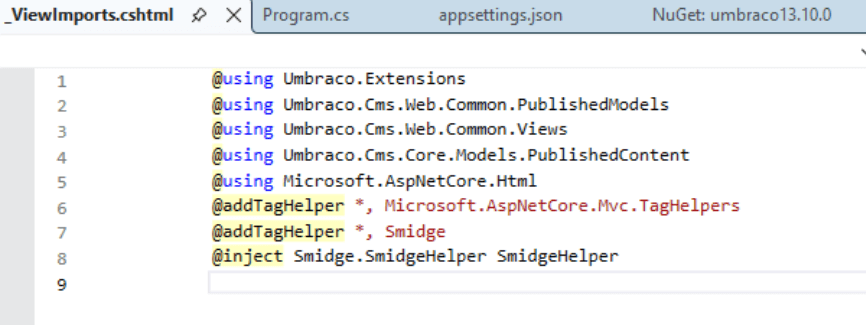
Scenario: Smidge Not Used
If Smidge is part of your project, install the community supported ptackage:
dotnet add package Umbraco.Community.Smidge
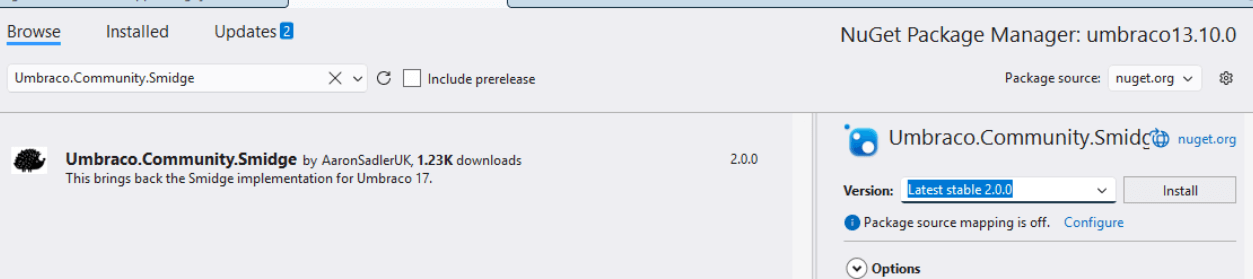
Prerequisite: Umbraco v16.1.1 or later
Configuration:
Add runtime minifier support:
builder.CreateUmbracoBuilder()
   .AddBackOffice()
   .AddWebsite()
   .AddComposers()
   .AddRuntimeMinifier()
   .Build();
Enable Smidge middleware:
app.UseSmidge();
await app.RunAsync();
You can use IRuntimeMinifier to minify assets at runtime.
Rich Text Editor Changes (TinyMCE to TipTap)
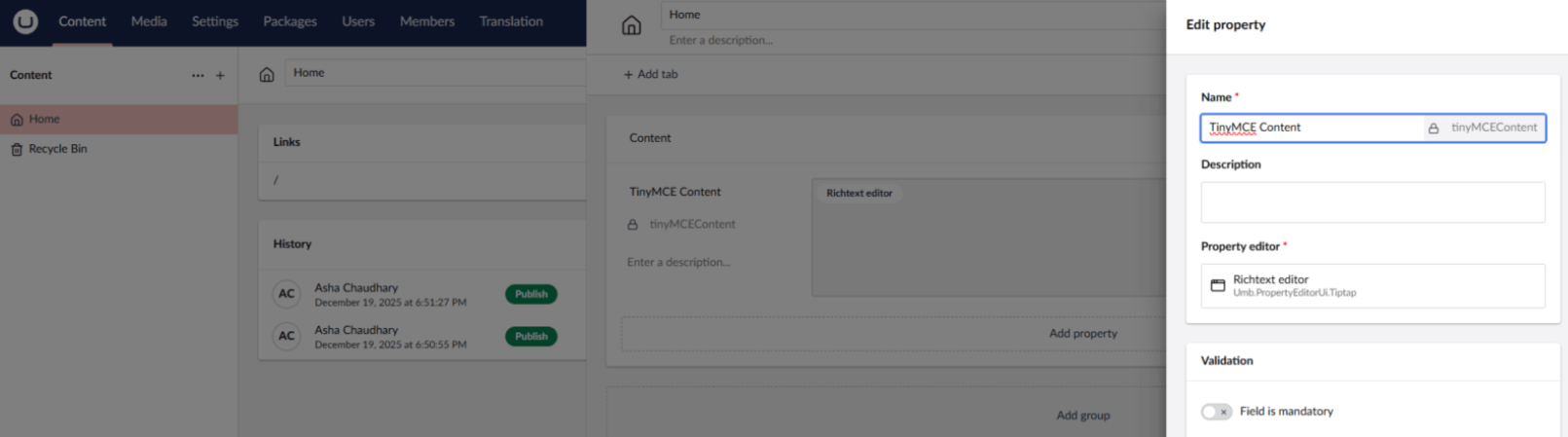
In Umbraco v13, Rich Text Editors were based on TinyMCE. During the upgrade to v17:
- Umbraco automatically migrates existing RTE content to TipTap as part of its standard migration.
- Existing content remains intact, but datatypes need review.
Important Notes
- If your project still requires TinyMCE, you must explicitly install and configure it in v17.
- Review and update all RTE datatypes in the backoffice after upgrade.
Upgrade Application’s Codebase
After completing the core framework and CMS upgrades, the next important step is to upgrade and stabilise the application codebase.
With Umbraco v17, a few APIs and services used in earlier versions are deprecated or removed. Because of this, existing custom code may require updates to align with the newer Umbraco patterns and services.
Key Areas to Focus On
- Upgrade all referenced NuGet packages to versions compatible with Umbraco v17
- Review custom services, helpers, and controllers for breaking changes
- Migrate code where deprecated Umbraco services are used
Upgrade Backoffice Extension Code
With Umbraco 17, the backoffice has moved towards a TypeScript-based extension model. Any custom backoffice extensions built for earlier versions may require refactoring or rewriting to align with this new approach.
What to Review and Update
- Identify all custom backoffice extensions, dashboards, or property editors
- Migrate JavaScript-based implementations to TypeScript, wherever applicable
- Update build pipelines and tooling to support TypeScript compilation
- Validate that extensions load and behave correctly in the v17 backoffice
Upgrading backoffice extensions early helps ensure a smooth editor experience and avoids unexpected issues for content editors.
Final Outcome
At this stage, the application is successfully upgraded from Umbraco v13 to v17.
Key Takeaways
- Carefully review editor and datatype changes
- Clean up deprecated APIs and middleware
- Regenerate models wherever required
- Handle Smidge and development mode dependencies explicitly
With these steps in place, your project will be running on a modern, future ready Umbraco stack powered by .NET 10.
Conclusion
Upgrading to Umbraco 17 is not just a version bump, it is a solid step towards better performance, modern tooling, and long term maintainability. With a structured approach and a bit of patience, the migration process can be smooth and predictable.
If you are planning a production upgrade, it is always a good idea to test thoroughly in lower environments and keep proper backups before running the upgrade.
With deep expertise in enterprise Umbraco upgrades, .NET modernization, and complex backoffice refactoring, we at Giriraj Digital ensures your upgrade is planned, risk-free, and aligned with your business goals. From architecture assessment and phased migration to content validation, performance optimization, and post-go-live support, our certified Umbraco experts handle the entire journey end-to-end. Let's connect with our Umbraco Experts and upgrade your website to Umbraco 17 with clarity, confidence, and zero surprises.
Happy Upgrading.
Frequently Asked Questions
Why should we upgrade from Umbraco 13 to Umbraco 17 now?
Umbraco 17 is the latest Long-Term Support (LTS) release, offering extended security updates, performance improvements, and long-term platform stability from Umbraco. Upgrading now reduces future risk, avoids technical debt accumulation, and ensures your digital platform remains compliant and supportable.
Will there be any impact on ongoing business operations?
No, With a structured migration approach:
- No content loss occurs
- Downtime is limited or avoided
- Editorial teams experience minimal disruption
- Most organizations complete the upgrade without affecting daily operations.
How long does the upgrade typically take?
- For Mid-size websites: 3–5 weeks
- For Enterprise platforms: 6–10+ weeks
Timelines depend on custom development, backoffice extensions, and integration complexity.
Does this upgrade require additional licensing costs?
No additional licensing is required for Umbraco CMS itself. However, there may be costs related to:
- Refactoring custom code
- Upgrading or replacing third-party packages
- Optional infrastructure modernisation
How are content types and data handled during the upgrade?
- Content data remains intact
- Nested Content is auto-migrated to Block List
- Single Block Properties are created automatically
Post-upgrade validation is required for complex content structures and rendering logic.
What happens to custom backoffice extensions?
All AngularJS-based backoffice customisations must be refactored or rebuilt using Umbraco’s Web Components-based extension framework. This is the most effort-intensive technical change in the upgrade.
How does the upgrade impact performance and scalability?
Umbraco 17 introduces:
- Improved repository caching
- More reliable background task execution
- Enhanced SignalR communication
- Reduced dependency on local file systems
These changes significantly improve performance and cloud scalability.


Dec 23, 2025
10 Mins read
Most Popular blogs
What’s New in Umbraco 17 ?
7 Mins read
Why Choose Umbraco over Sitecore?
6 Mins read
The Detailed Guide to Hiring Umbraco Developers from the Outsourcing Company!
4 Mins read
Nikhil Joins the Umbraco CMS Advisory Board 2025
2 Mins read
Giriraj Digital Becomes Umbraco Gold Contributing Partner
3 Mins read
Top 5 Umbraco Hosting Options
4 Mins read
Why Umbraco is the right choice for your eCommerce needs ?
3 Mins read
How Umbraco health checkups will help your site going smooth & appeals customers
3 Mins read
Umbraco Education Program India
5 Mins read

Join 1500+ people for our free Newsletter
Sign up now to receive exclusive updates, industry insights, and special offers directly to your inbox.
